Not many software trackers but many tracker-like programmes have this feature and it is extremely helpful.
There should be patterns, that contain data only for a single track.
Nice to have: patterns for a specified number of tracks.
What should this feature achieve?
Combine parts from different patterns to create a new 16-track pattern to create musical variations.
Speed up work by not having to copy & paste single track parts.
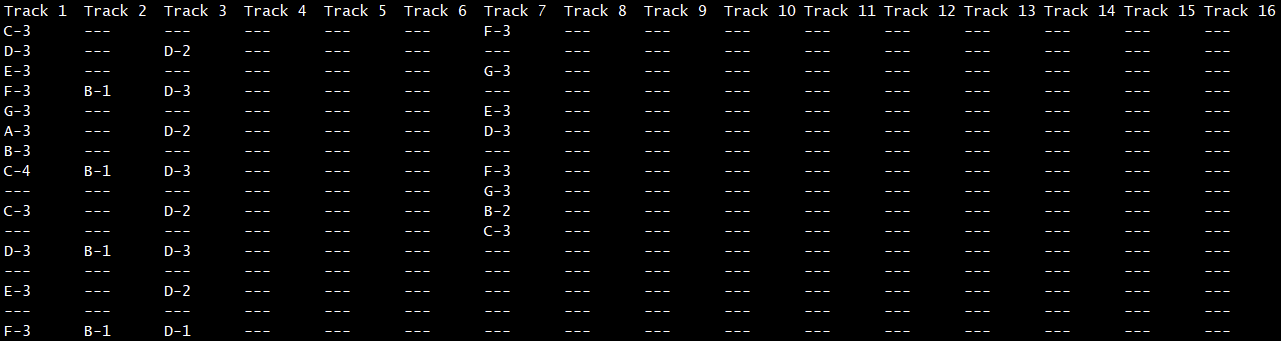
How all patterns look like today:
sixteen tracks.
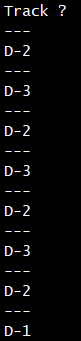
What I would like to have:
a stored single-track pattern to put into any track I want without having to copy the notes or track parts out of a sixteen-track pattern.
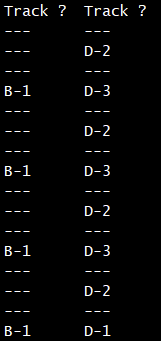
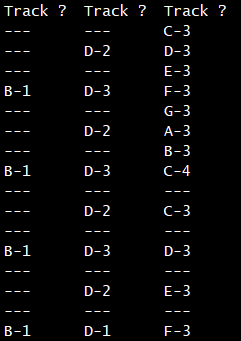
Or, even more flexible:
patters of any width.
This is much more comfortable than loading a track pattern into the tune, copying the parts one wants to use and deleting the previously loaded pattern from the tune. I have used trackers and tracker-like tools, that work like this during more than thirty years and am simply used to that workflow. I am sure, this would be an advantage for other users as well.
Nope, this is not what I want. I don’t want to copy & paste and I don’t want to have the same content in various tracks. I want to have patterns that have only one track. I want to be able to insert one pattern into track 1 (one or more times), another pattern into track 2 (also one or more times) and so on. Also, in the view shown in the video, you cannot see the pattern content, which doesn’t make it easier. If I could at least name the patterns or song areas and if these names were displayed in the Song view, it would be an acceptable workaround.
In Song view, I select a certain part that already is used in the tune. But I want to create patterns and use them when and wherever I desire.
A long time ago, I used Future Composer for Commodore 64. In this tool, you wrote a pattern (for a single track) and then inserted the already existing pattern into the song, no matter the track or time. The only downside was, that I had to memorise the pattern numbers. Names would have been more efficient.
First, I am going to find the option to name patterns and see if this suits for me. Thanks for that.
What i do is to utilize pattern 49 onwards as a lead sheet and than start building the song with pattern 1 copying the tracks (blocks) in the desired order. Should be something like this or i still dont get it😅
This could work for me. But I give you a better example.
First, I create many, perhaps all, patterns for the tune. After finishing all the patterns, I start to add them to the tune in the desired order and tracks. For me this works much faster than creating a pattern, adding it to the tune, create another one and add it and so on.
I find the process of copying/pasting patterns, then having to manually adjust the length of each pasted pattern to match the previous one, tedious. This is THE single reason that my Tracker+ is collecting dust, which is a shame because I absolutely love the new software synths.
I think the Dirtywave M8 does it best: Patterns can contain several chains (16-step sequences). You can then recall and place a pattern by ID in any track in the song view. You can still clone a pattern if you want one-off changes or variations.
Looping a pattern is cool and all, but I (and I assume the OP) am looking to recall a specific track pattern one or many times throughout a song. This would make track patterns independent from the entire pattern row as a whole.
Here’s an example:
I have song with two patterns. I created a drum sequence in the first track of the first pattern. I would like to recall and place that specific track pattern on the third track of the second pattern. Should I update that track pattern in any location, the changes would be reflected in every location where I’ve referenced that track pattern.
This describes it more clearly. So essentially its about linked track sequences (or blocks) across multiple patterns. Perhaps the OP can agree to change the title and add your description to make it a bit easier to understand?
It’s been 3 days since OP posted. I’m reasonably certain we’re asking for the same feature. Would it be worthwhile to recreate this request myself with my more detailed description?
This is implemented on the m8 tracker and it’s great but the whole reason I bought the tracker mini again was because the sequences aren’t saved together globally. Changing one pattern never effects another pattern no matter if you copy and pasted it — and that’s a great feature and if it was changed I would sell my tracker mini as it would basically just be a larger m8 at that point.
I’ve read your thread about copying and saving a certain part of the song and it is not what I really want. I am going to have another approach as soon as I have the time.