Device not detected as MIDI device after Windows 11 March 2026 Cumulative Update

Hi,

I updated my laptop to latest cumulative update (KB5079473) recently only to discover that Synth is no longer detected as MIDI device. I suspected USB cable, or laptop itself, but after uninstalling this update Synth is usable again, so no doubt it’s the cause.

Found that MS introduces a lot of changes to MIDI support with this update (for the better, it seems, and it’s no joke), but ditches legacy drivers that apparently Synth is using. (Yeah, no other synths of mine has been affected).

Support ticket submitted, hoping that Polyend team will quickly sort these things out.

1 Like

Ok, after spending some time on investigating the issue, I found a workaround that makes the Synth operational again without having to uninstall KB5079473 cumulative update: after turning Synth on, go to device manager and open it at “Sound, video and game controllers” branch. There, in driver section, click “Restore previous driver”. Once done, shut Synth down and start it up again - you should now find it usable again.

2 Likes

Have not updated my Windows instance yet. Will update here how it goes tomorrow.

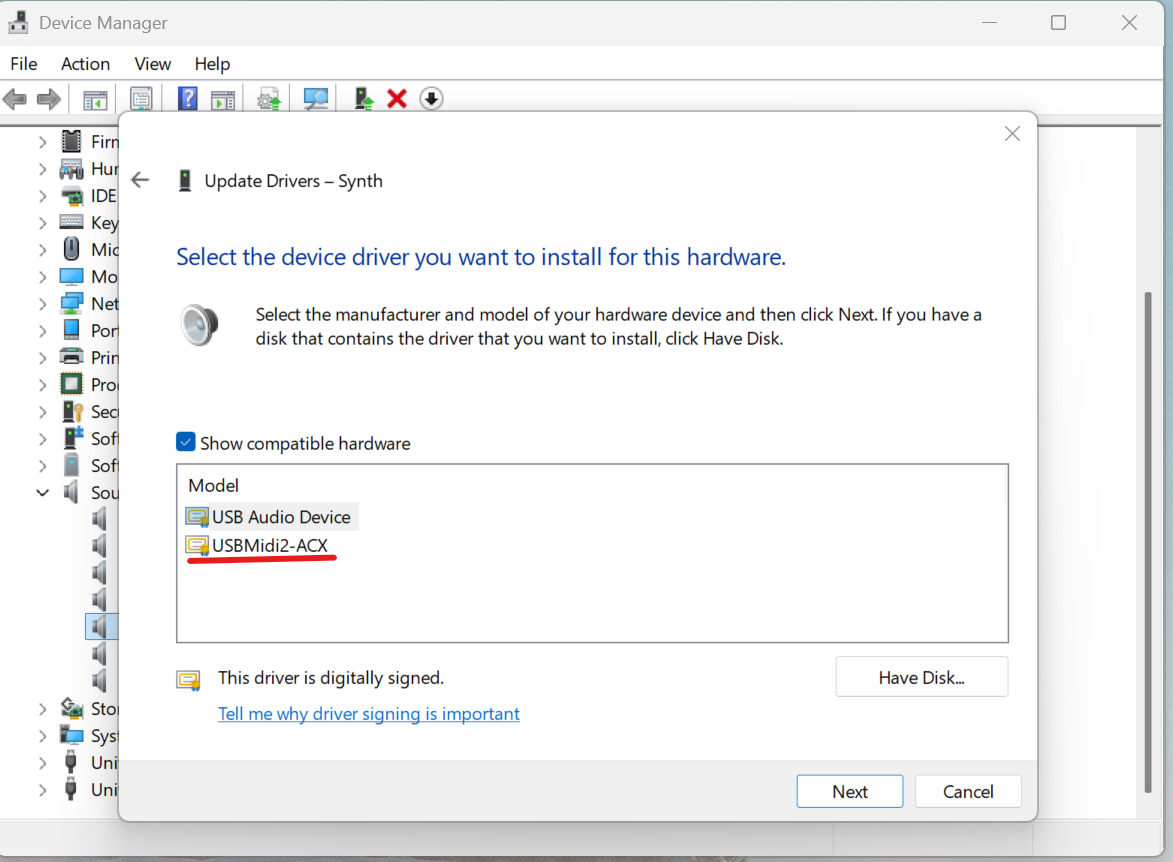
Thanks, we had to chang the midi driver to USB Audio Device, and now it is working properly. For some reason it has chosen the USBMIdi2-ACX.

3 Likes

Battled all evening trying to get that KB5079473 update installed :laughing:

Can confirm.
It defaults to the new USBMIDI2-ACX drivers. Changing it to the old drivers fixes the issue.

It looks like you may have to do that separately for each USB port to which you connect the Synth.

You mean each port on your computer? That’s possible. Windows isn’t smart like that :laughing:

Even worse: I was able to get it to work; but then I tried explicitly installing the new driver again, and now I’ve gotten my machine in a state where no matter what I do, I can no longer get Synth to establish a USB-MIDI connection to my computer. I have tried explicitly installing each driver, removing the device entirely in Device Manager and restarting the machine, then installing the driver again, connecting Synth to previously untried USB ports, and so on.

Other class-compliant devices do not seem to have this problem. For example, I’ve tried it with a Torso T-1 and it seems to work fine, I’ve also tried a Novation Launchpad Mini Mk3, but that seems to have quietly installed a Novation driver in the background. I’ve also tried a Korg NanoKey Fold, which works fine with no special pleading.

So I do think there’s some kind of problem in the Synth MIDI implementation.

It’s impacting multiple vendors. I set my window updates to update manually and usually wait a month or so to see if anything breaks. It’s frustrating and “should” be unacceptable, but it’s the reality of living in a MS windows world.

Maybe one of the workarounds listed here could help you out?

Adding the post that InMusic wrote on the subject. Might have some info here as well that could help. Sounds like the actual workaround is to uninstall the windows update.

Thesycon.de has a little tool that displays the USB descriptors of any USB device connected to a Windows computer. When I tried running it on my Synth, it said that there are errors in the Synth’s USB descriptor. Here is its output:

Information for device Synth (VID=0x16D0 PID=0x111A):

*** ERROR: Descriptor has errors! ***


Connection Information:

Device current bus speed: HighSpeed
Device supports USB 1.1 specification
Device supports USB 2.0 specification
Device address: 0x0022
Current configuration value: 0x01
Number of open pipes: 2


Device Descriptor:

0x12 bLength
0x01 bDescriptorType
0x0200 bcdUSB
0xEF bDeviceClass (Miscellaneous device)
0x02 bDeviceSubClass
0x01 bDeviceProtocol
0x40 bMaxPacketSize0 (64 bytes)
0x16D0 idVendor
0x111A idProduct
0x0101 bcdDevice
0x01 iManufacturer “Polyend”
0x02 iProduct “Synth”
0x00 iSerialNumber
0x01 bNumConfigurations

Device Qualifier Descriptor is not available. Error code: 0x0000001F


Configuration Descriptor:

0x09 bLength
0x02 bDescriptorType
0x0053 wTotalLength (83 bytes)
0x01 bNumInterfaces
0x01 bConfigurationValue
0x00 iConfiguration
0x80 bmAttributes (Bus-powered Device)
0x32 bMaxPower (100 mA)

Interface Descriptor:

0x09 bLength
0x04 bDescriptorType
0x00 bInterfaceNumber
0x00 bAlternateSetting
0x02 bNumEndPoints
0x01 bInterfaceClass (Audio Device Class)
0x03 bInterfaceSubClass (MIDI Streaming Interface)
0x00 bInterfaceProtocol (Audio Protocol undefined)
0x00 iInterface

MS Interface Header Descriptor:

0x07 bLength
0x24 bDescriptorType
0x01 bDescriptorSubtype
0x0001 bcdMSC
0x0025 wTotalLength (37 bytes)

MS MIDI IN Jack Descriptor:

0x06 bLength
0x24 bDescriptorType
0x02 bDescriptorSubtype
0x01 bJackType
0x01 bJackID
0x00 iJack

MS MIDI IN Jack Descriptor:

0x06 bLength
0x24 bDescriptorType
0x02 bDescriptorSubtype
0x02 bJackType
0x02 bJackID
0x00 iJack

MS MIDI OUT Jack Descriptor:

0x09 bLength
0x24 bDescriptorType
0x03 bDescriptorSubtype
0x01 bJackType
0x03 bJackID
0x01 bNrInputPins
0x02 baSourceID(1)
0x01 baSourcePin(1)
0x00 iJack

MS MIDI OUT Jack Descriptor:

0x09 bLength
0x24 bDescriptorType
0x03 bDescriptorSubtype
0x02 bJackType
0x04 bJackID
0x01 bNrInputPins
0x01 baSourceID(1)
0x01 baSourcePin(1)
0x00 iJack

Endpoint Descriptor (Audio/MIDI 1.0):

0x09 bLength
0x05 bDescriptorType
0x01 bEndpointAddress (OUT endpoint 1)
0x02 bmAttributes (Transfer: Bulk / Synch: None / Usage: Data)
0x0040 wMaxPacketSize (64 bytes)
0x00 bInterval
0x00 bRefresh
0x00 bSynchAddress
*** ERROR: Invalid wMaxPacketSize. Must be 512 bytes in high speed mode.

MS Bulk Data Endpoint Descriptor:

0x05 bLength
0x25 bDescriptorType
0x01 bDescriptorSubtype
0x01 bNumEmbMIDIJack
0x01 baAssocJackID(1)

Endpoint Descriptor (Audio/MIDI 1.0):

0x09 bLength
0x05 bDescriptorType
0x81 bEndpointAddress (IN endpoint 1)
0x02 bmAttributes (Transfer: Bulk / Synch: None / Usage: Data)
0x0040 wMaxPacketSize (64 bytes)
0x00 bInterval
0x00 bRefresh
0x00 bSynchAddress
*** ERROR: Invalid wMaxPacketSize. Must be 512 bytes in high speed mode.

MS Bulk Data Endpoint Descriptor:

0x05 bLength
0x25 bDescriptorType
0x01 bDescriptorSubtype
0x01 bNumEmbMIDIJack
0x03 baAssocJackID(1)

Microsoft OS Descriptor is not available. Error code: 0x0000001F


String Descriptor Table

Index LANGID String
0x00 0x0000 0x0409
0x01 0x0409 “Polyend”
0x02 0x0409 “Synth”


Connection path for device:
USB xHCI Compliant Host Controller
Root Hub
Synth (VID=0x16D0 PID=0x111A) Port: 1

Running on: Windows 10 or greater (Build Version 26200)

Brought to you by TDD v2.19.0, Dec 5 2023, 12:08:38
1 Like

That is actually pretty good information, that this tool provides!
I‘m not going to answer on the other topics (1, 2, 3, 4 ,5), to not have the conversation be scattered all over the place - hope that‘s ok.

Here‘s what this probably tells us:

Since this Windows update, Microsoft introduced the new MIDI stack and a few things have changed. Your log shows that the device(s) fail the USB handshake because of two specs not being compliant (which the new Windows MIDI Class Driver is now strictly enforcing).

  1. The device identifies as a HighSpeed device, but the MIDI Endpoints (Endpoint 1 IN/OUT) are reporting a wMaxPacketSize of 0x0040 (64 bytes).

    Per USB 2.0 Spec: High-Speed Bulk endpoints should be exactly 512 bytes.
    Which results in Windows now flagging this as: Invalid wMaxPacketSize and terminating the connection.

  2. The other issue is that the device does not provide a Device Qualifier Descriptor (Error 0x0000001F).

    Per new requirements: any device capable of both High-Speed and Full-Speed operation must provide this descriptor to inform the host of its capabilities at the alternate speed.

As a workaround for now: use the older driver as highlighted by Mitch in his comment above.

I‘ve also recategorized this post and added all the devices that exhibit this issue as tags. Hope that‘s ok :hugs:

Works for me! At least now I know that the problem is known and will probably be fixed in the fullness of time, and I have a workaround that lets me deal with it until the fix shows up.

Hi All.

Ark contacted me on our Discord server, which is where we do support for the new Windows MIDI Services stack. Windows MIDI / Audio . There’s also info there in #start-here for how to disable the new MIDI feature if you are completely blocked.

There are a few things in this thread that are important to clarify

  • The only drivers that cause service crashing right now are inMusic (AKAI, m-audio, RANE, etc.). We are working with inMusic on getting their drivers fixed. In most cases, you can simply uninstall their drivers and use our in-box drivers. Although we’d love people to use our in-box class drivers now that everything is multi-client, third-party drivers are still supported. We have customer reports of these drivers hanging on close in the past, before the rollout, but that would impact only the single app and could be cleared by unplugging the device. With the new service involved, trying to close these drivers hangs every MIDI device.
  • If you use KORG drivers, KORG has already posted recommending that you remove them and use our in-box drivers. These don’t cause service crashes, but the install/uninstall and other helper tools do mess up the registry. If, for example, tools like MIDI-OX cannot see any MIDI ports, this is almost always the reason why. We have info on the Discord server.
    • Those drivers have been a problem for the last 20 years and are responsible for why people think you can have only 10 MIDI devices in Windows. It’s because they use the circa-1993 driver model instead of something more modern.
    • We even have a tool in the SDK Runtime and Tools download which is used to fix the registry for 64 bit apps. Currently, it does not fix it for 32 bit apps like MIDI-OX, but I will update it to do so.
  • The packet size issue in the descriptors is pretty common. We don’t block drivers based on that. It would be nice to see it fixed, but again, not unusual.
  • If you change the driver a device is using, you usually need to restart the MIDI service or reboot your PC. This is a limitation we’re working to get around, but right now we do not get the correct notifications from the system for many devices that a device was removed and readded. This doesn’t always happen, but it is common. It’s quite likely what you are seeing here.
  • USB Audio Device 1.0 is our combined MIDI 1.0 and USB Audio 1.0 class driver. We’ve fixed a couple SysEx bugs in that, but otherwise, it’s the same driver that has been in Windows for ages.
  • USB MIDI2 ACX is the new combined MIDI 1.0 and MIDI 2.0 class driver. It supports class-compliant MIDI 1 and MIDI 2 (UMP) devices, and is faster than the older driver. There are a few devices out there that, because of how their USB descriptors are set up, get automatically assigned to this driver.
    • The new driver supports all class-compliant MIDI 1 devices. If it’s not working here, we’d like to know.
  • We did harden descriptor checks in Windows 11 close to a year ago for security reasons. However, descriptor failures that block on Windows will block 100% of the time, not randomly, so I don’t think firmware is the issue here, at least not the part generating descriptors.

For any questions related to the new MIDI stack, please join the Discord server Windows MIDI / Audio and see #start-here for where to post and where the information can be found.

Pete
Microsoft

1 Like

Hey @psychlist1972 / Pete , welcome and thank you so much for joining and providing more detail! That is super useful! :heart:

I‘ll make sure to pass all the info along :hugs:

1 Like

@Mitch Doesn’t look like I can PM here. But you can email me at pmbrown@microsoft.com if you all need assistance with anything MIDI-related.

I can’t reasonably answer customer emails there, just partner companies like you all.

Pete
Microsoft

1 Like

Just highered your user status so PM‘s should be possible now.