Hi. Just for my Mess.
Anyone know what the midi cc for bypass so I can program change ?
Is there a better midi cc list than the manual? It doesn’t show much.
I’m using a Morningstar Mc6.
Hi. Just for my Mess.
Anyone know what the midi cc for bypass so I can program change ?
Is there a better midi cc list than the manual? It doesn’t show much.
I’m using a Morningstar Mc6.
Yes that would be nice to have a full list of cc commands !
Hey there you two, welcome to Backstage! 
MIDI Program Change is not really a CC.
A quick look at the Morningstar MC6 Manual indicates that this is its own Message Type in those devices that you can setup:
Hope that helps.
That wasn’t really a helpful answer I’m afraid. We all know PC is not the same as CC, that wasn’t the question. The question is : how can we program our midi controller to engage or bypass the Mess ?
And while I’m at it : how can we program our midi controller to engage presets numbered above 127 ?
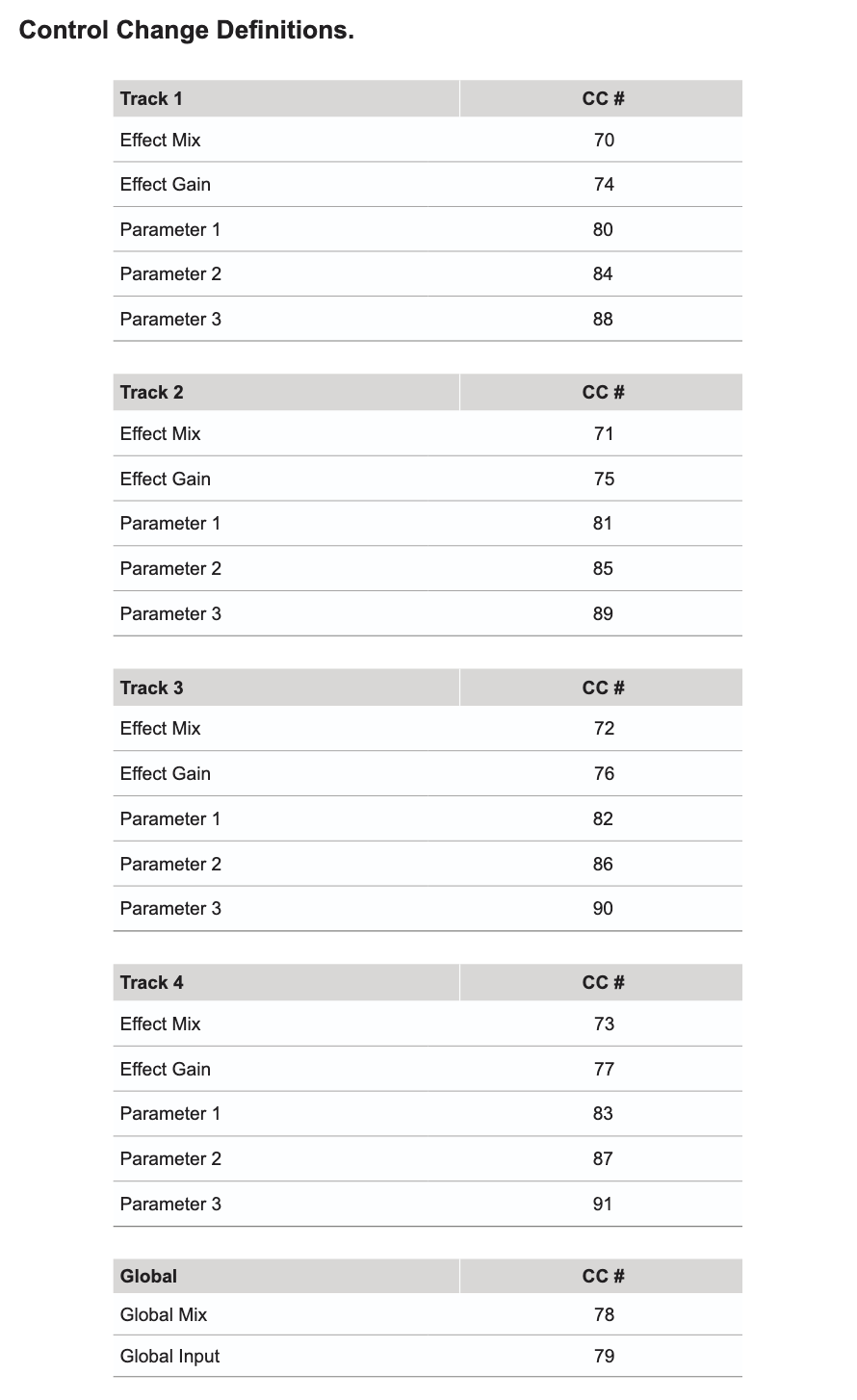
Could you not use CC 78 (Global Mix) at 0 as a pseudo bypass?
That’s a pretty good idea actually, thanks. Didn’t think about that !
Thanks, I already read this list but there’s nothing about engage/bypass start/stop, presets over 127… so, yeah.
Yes! So glad you are with me on this.
It’s such a basic thing to have a CC for engage and bypass. All my other midi effects have this number first on the midi CC list.
I hope we get some basic CC’s on an updated list. Not sure how anyone else is engaging saved presets from a midi controller, or am I missing something obvious ?
Hi. Thnx. But this didn’t work
I was able to get it working on my end, but it will really end up being patch-specific, depending on what you want your global mix to be when engaged.
The way I did it was setting up a toggle button on my MIDI controller with the first value at 0 and the 2nd value at whatever I want the mix to be set at. A quick search shows that it should work with your Morningstar.
To create a MIDI toggle button on a Morningstar MC6,
enable “Toggle Mode” for a specific switch to send different MIDI messages with each press. This allows a single switch to toggle between two states, such as turning a pedal on and off, by assigning two different MIDI messages to “Position 1” and “Position 2”. You can then save these settings as a preset.
Hi Dann,
Thanks for sharing. I think This is what I do with every bank/preset.
But you said you got it working. I’m still so on the fence if I’m gonna keep this
Please can you send me a screenshot
Ok. With the CC or 78 i am seeing the preset change on the Mess. But the mess remains off. It does not engage the pedal on or turn the pedal off.
It won’t turn the pedal on and off. It’s just going to set the main mix to 0 and whatever value you set for the 2nd value.