What is the problem?
Currently, the Move parameter can only shift steps left and right. The device seriously lacks new transformation algorithms to quickly modify already written melodies or rhythms.
What should this feature achieve?
This feature should turn the Move parameter into a powerful transformer tool. New algorithms will allow users to compress, expand, and shape existing steps and notes around a selected anchor pad, creating tons of new variations. Completely in the spirit of the Polyend Play workflow.
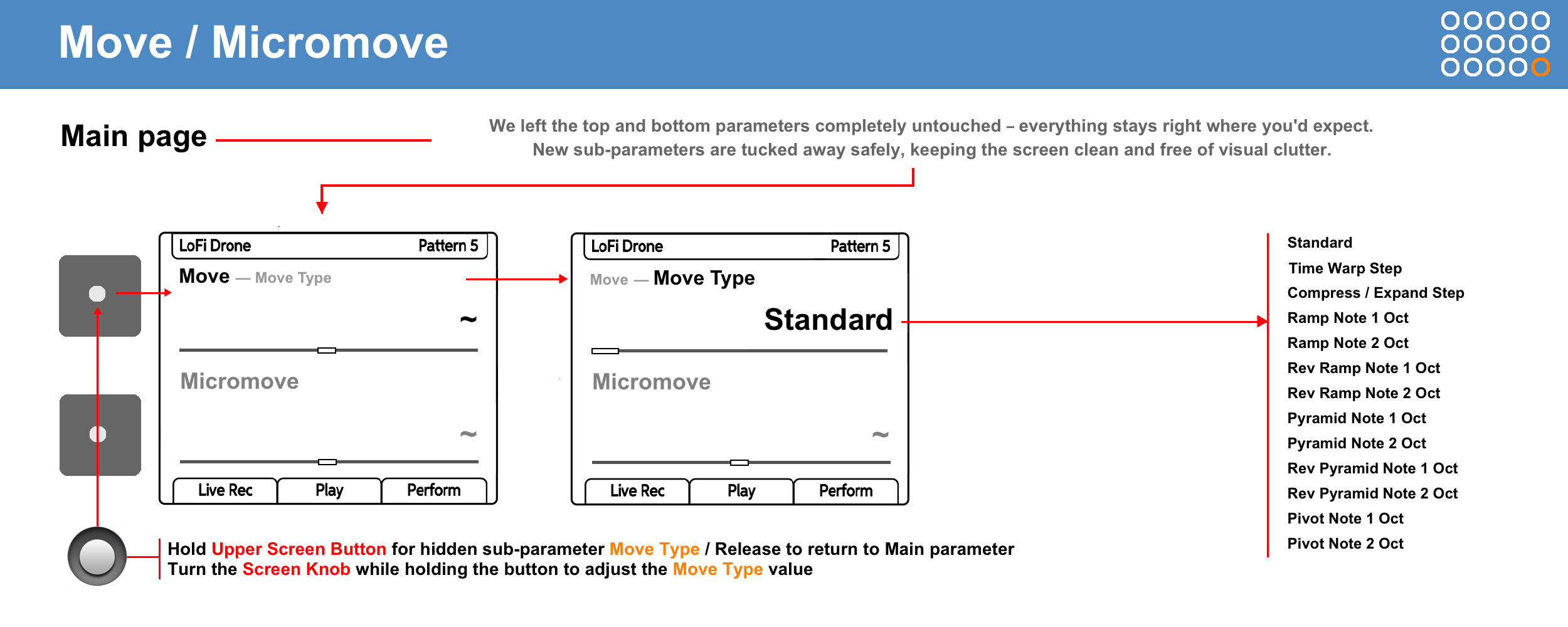
I’d like to suggest turning the existing Move / Micromove screen into a powerful transformer tool, completely in the spirit of the Polyend Play workflow. Instead of just shifting steps back and forth, we could add a few geometric transformation algorithms for steps and notes.
The Essentials
• All algorithms work exclusively with notes and steps that are already written on the track. They do not generate data out of thin air.
• The algorithms use relative note/step offsets. This means a complex melody with different notes won’t turn into a single-note mess - it will keep its unique pattern and layout, smoothly bending according to the selected mode.
• Unlike the default Standard mode, where you hold a step to move that specific step, the new modes work differently: the held step becomes an Anchor. It acts as a stationary reference point, and the other steps around it are the ones that change and move.
• The workflow itself remains native to Polyend Play: you hold the Anchor pad with one hand and turn the Move knob with the other. Except now, the held step stays locked in place, while the rest of the pattern around it compresses, expands, or shifts pitch - depending on the selected algorithm.
• The classic Standard mode does not use the anchor concept. To shift notes here, you just select specific steps or the entire track, exactly like it works now.
• Any pitch changes in all Note modes are automatically quantized to the selected Scale Filter.
• If you twist a melody beyond recognition using multiple algorithms in a row, you can easily go back to the original using step-by-step Undo.
MOVE TYPE
- Step Transform -
• Standard: The classic, original shifting of steps left and right across the sequencer grid. This is the default mode, ensuring 100% backward compatibility so old projects won’t be affected.
• Time Warp: Turning the Move knob to the right exponentially stretches the steps forward from the Anchor, while turning it to the left stretches them backward from the Anchor. Changes happen destructively and strictly in full grid steps without microtiming. Any steps that fly past the pattern edges are permanently cropped. To recover your original pattern, simply use the step-by-step Undo.
• Compress / Expand: Turning the Move knob to the right evenly expands all steps outward from the Anchor in both directions, increasing the spacing between them, while turning it to the left compresses them toward the Anchor into a tight cluster. Changes happen destructively and strictly in full grid steps without microtiming. Any steps that fly past the pattern edges are permanently cropped. To recover your original pattern, simply use the step-by-step Undo.
- Note Transform -
• Ramp 1 & 2 Oct: Turning the Move knob to the right shapes the notes after the anchor into a steady upward ladder, while turning it to the left slopes the notes after the anchor diagonally down. The anchor pad itself always stays locked in place. You can choose the range between 1 or 2 octaves.
• Rev Ramp 1 & 2 Oct: Turning the Move knob to the right shapes the notes before the anchor into a steady upward ladder, while turning it to the left slopes the notes before the anchor diagonally down. The anchor pad itself always stays locked in place. You can choose the range between 1 or 2 octaves.
• Pyramid 1 & 2 Oct: Turning the Move knob to the right shapes the notes upward around the anchor into a triangle Peak, while turning it to the left shapes them downward into an inverted triangle Valley. In both cases, the anchor acts as the center point, with notes on both sides sloping evenly toward the edges of the pattern. You can choose the range between 1 or 2 octaves.
• Rev Pyramid 1 & 2 Oct: Turning the Move knob to the right shapes the notes upward from the anchor into an inverted triangle V-shape, while turning it to the left shapes them downward from the anchor into a regular triangle. In both cases, the anchor acts as the center point, with notes on both sides sloping evenly toward the edges of the pattern. You can choose the range between 1 or 2 octaves.
• Pivot 1 & 2 Oct: Turning the Move knob to the right tilts the phrase around the anchor like a see-saw — the right side goes up, while the left side goes down symmetrically. Turning it to the left does the exact opposite, lifting the left side and dropping the right. The anchor pad stays locked in place as the center axis. You can choose the range between 1 or 2 octaves.
WORKFLOW
Step 1: Activating Move Type Mode
-
Navigate to the Move / Micromove page.
-
Press and hold the Upper Screen Button: the Move parameter instantly changes to the Move
Type sub-parameter. -
While holding the button, turn the Screen Knob to switch from the default Standard mode to any of the new geometric transform algorithms.
-
Release the screen button. Move Type mode is now active.
Entering Steps
The new algorithms work strictly with already existing notes. Before starting the transformation, you must have a ready melody or rhythm recorded in advance into the sequencer via step sequencing or live recording.
Step 2: Step Editing
-
Hold down any single step on the sequencer grid. In the new algorithms, this held pad functions as an Anchor – a fixed and stationary reference point.
-
While holding this pad / anchor, change the Move parameter. You will hear all changes in real time.
-
The held anchor step itself stays strictly in place, while the surrounding steps will move (compress, expand, or change pitch) depending on the selected algorithm. Changes to step positions (in Step Transform modes) happen as follows: any steps flying past the pattern boundaries will be deleted. Changes to note pitch (in Note Transform modes) are limited to 1 or 2 octaves—upon reaching the ceiling, notes will hit the limit but will not be deleted. To return to the original pattern, use the Undo function.
Editing Selected Track
The new algorithms are blocked if the entire track is selected, as their operation requires a single physically held pad (Anchor).
Backward compatibility
This won’t be an issue at all. When you load an old project, it will always default to Standard mode.
Such parameters strictly follow the Polyend Play+ rule of “one step = one event”. They don’t break the logic or the rules of how the sequencer works.