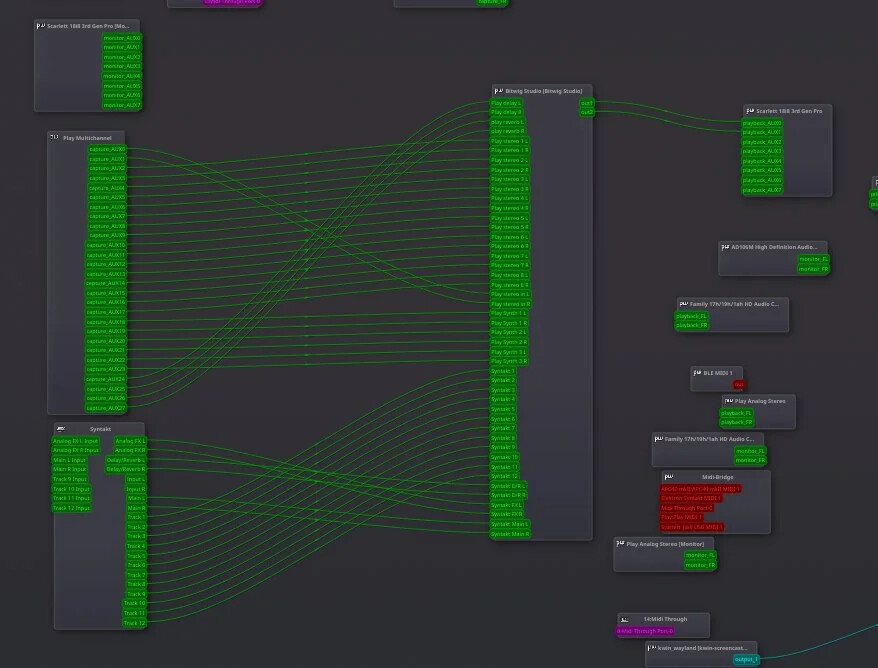
Hi! I am trying to use the above setup, but it’s been very complicated for me to set it up:
I am rewiring both the play plus and a syntakt (with overwitch) to bitwig, and bitwig to my scarlett.
The main problem I face is that i NEVER manage to connect the play plus with correct sample rate in the first try, it always makes the classical resample problem noises until, while changing latency/sample rate, it somehow manages to connect, (normally at 44.1kh and 512/256 latency, which is less than ideal since I also want to play the polyend synth live and latency is not ideal, but, ok, I’m buying it)
however
IF the play is connected, the syntakt inevitably will lose sync sooner or later, specially when i click on bitwig
I have been back and forth trying to solve the problem for a few weeks now, tried every tool you can imagine, but I never managed to fully solve this problem.
has anybody faced similar complications?
Thanks in advance 
EDIT: BTW I have no problems AT ALL when the play is disconnected 
Have you tried changing the clock source to the soundcard?
I recall an rk008 was supposed to be a midi super controller. Might try one of those?
1 Like
yuo! somebody in bitwig’s discord recommended it, but no luck
I use an akai APC40MK2 but I don’t see how toe midi might affect? Can you please elaborate? Thanks in advance
There are two issues here.
One is audio and bitrates. Try setting everything to the common denominator - 44.1khz, lowest sample rate. A mismatch might cause latency.
The second is midi. You say the Elektron loses sync. There might be a conflicting clock. Decide which item is to be master clock. Clock settings, internal for that device. Sound card is often the sensible choice but not always. Then set all other items to clock source input.
If say soundcard as master doesn’t work, set bitwig as clock out, and everything else as clock input.
if not, try Elektron as clock internal/clock out, and change bitwig to external clock in. Etc.
1 Like
This is the setup as seen from qpwgraph
For midi clock I send a master clock from BW with a uxmidi box, and get decent sync so far
What I mean is distortion and glitches appear I must recgnize my original post wasn’t very explicit, sorry
For example:
Play, usually gets recognized at first, however it’s like a 75% possible I get digitally distorted sounds. if that’s the case, changing latency (between 256 and 512) might solve the issue, however if I change multiple times, it totally disappears from qpwgraph until next reboot
The elektron mostly works, but if I have the play connected, when I change ANY setting in bitwig loses sync, a high pitch sound enters through USB (Audio with the jack is fine) and returns at a later time
Finally the focusrite (With the LR pair from the synth) usually works very well, however if I change the settings for the Play problem, it might get the digitally distorted sounds (Like with the play by default lol)
Everything is set to 44.1khz because I read here that’s mandatory to get the play working
Also tried to create a composite device with bitwig between play and focusrite with no luck i get the same problems using that technique.
I leave in a work travel until saturday, i’ll try your recommendations then.
Thank you very much
Hi! @paul-8189 and thanks again for your help
Everything is supposedly as you recommend, but still I get the same result, even to the point that pressing play makes everything sound with the samplerate distorted sound but when I switch it off (while running) makes it sound good again automatically
I feel very stuck with this problem, for now I have bounced several tracks (When the play sounds good) and playing it as clips, but it’s not an ideal solution because I’, stuck with audio and can’t make changes to the sounds in the play
Oh dear. I recommend doing a video of the problem as it’s gone beyond my knowledge. It suggests that the Play is sending midi cc commands or some audio data stream over the usb connection which is either changing settings of other kit, or the static is causing random midi information signalling, causing other kit to get confused.
Does it resolve if you isolate audio to just the i/o and midi to usb?
In audio terminology crosstalk.
It might also be due to midi power being notoriously grungy, but as I say, it’s gone beyond my Ken.
1 Like
Yes, AFAIK, when the play is out everything sounds normal
then again other times its gets 98~ BPMish while my project is at 140 (With the weird sound issues) Then, when I unplug it, bam! Everything sounds normal again.
So so weird man
I’ll try to make a video on holidays
I use a different setup, but when I plugged my play into Tracker+ as an input source, the sound was clipping massively, until I cut the main volume on the play and added some limiting.
Oddly even if the sound was quite quiet coming out of the Play, it was distorting into the T+ - distortion, clicks, and sound dropouts for approx 1/2s each - so it took a bit of time to get the levels right. I ended up with about -5 on main volume, and -16-20 on the squishy, but it was a bit of a faff.
could it be a clipping issue?
Sorry for the late response, this is the problem:
My voice sounds very low because i recorded it with my laptop’s mic, but i think the video explains the problem perfectly
Yes it’s beyond me. If samplerate and bpm are changing, all I can think of it something is sending audio or random data over a midi connection.
You could try disabling some of the midi inputs or outputs on the play so it’s only receiving stop/play/clock, or only receiving on one channel.
Just a minute. Are you using midi A or B TRS connectors? Try the opposing kind?
So I spent some time with play and tracker+.
My play is second hand so ymmv.
It will not output midi. It does output noise on midi out channel (I checked with headphones and it does make electronic noise, which glitches digitally when main volume is adjusted), and accepts midi transport and notes in, but does not output recognisable midi data. I tried on the current beta and last stable fw, and tried direct to tracker with 2 different cables, both of which worked on receive.
I also tried using it with both T+ and digitakt.
So 2 cables and 2 different machines.
As stated, it’s s/h and looks like it may have been dropped, so it’s unlikely to be the same thing, but it’s odd that there is digital bleed from the vol control.
So in summary, have you tried checking the midi data stream, say with midi ox, to see if it’s transmitting properly?
Hi!
Sorry for the late reply
I think it might have to be with the audio engine TBH, because I’ve seen that the recommended way to use it is by setting the play as audio interface. And in the windowze tutorial a new composite audio device is created, however it doesn’t fit my needs because i want to run realtime as much as possible because I want to create a hybrid setup.
So I settled to record the tracks from play inside my daw and syntakt and the synths as LR stereo pairs, its a very reliable setup and for now if fits my needs, however, it makes me unable to use the perform mode in play.