Bug Description
Macro FX changes decays the step after its programmed, only for the kick, hat, tom specifically.
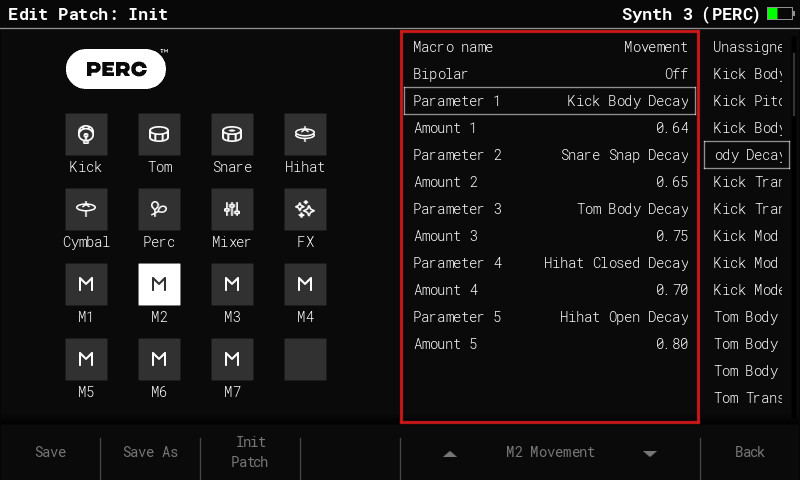
I’ve tested other synth engines and it works as expected, and I’ve tried other Macro FX for the PERC synth and it works as expected. I noticed it initially on Macro 2 as that is set to affect body decays by default (labelled as Movement). However I’ve tried to replicate this with Macro 1 and it shows the same bug.
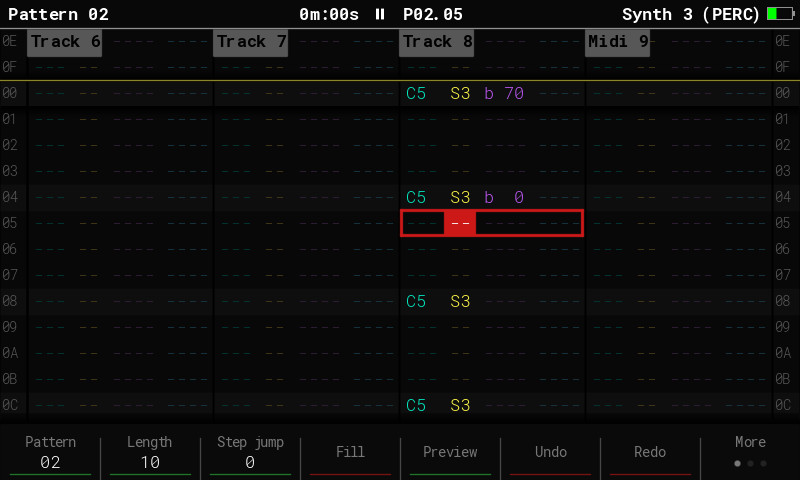
I’ll upload a photo of the pattern as well as the macro editor. EDIT: Added some screen grabs from the Mini. Also this might affect the tracker+ as well but I don’t have one to test it on
Steps to Reproduce
- Create a new project
- Change one of the synth instruments to PERC (for example S3)
- Create a simple pattern e.g. C5 S3 every four steps
- Add FX e.g. step 00 should be C5 S3 b70, step 03 C5 S3 b0
- Play the pattern. The Kick decay should be longer on step 00 than step 03, however it’s the other way around.
- Change the note for all the steps to D5 so it’s now a snare playing. The behaviour is correct i.e. step 00 has a longer decay than step 03
- Change the note for all the steps to E5 so it’s now the hi hat. The buggy behaviour presents itself again i.e. the hi hat decay in step 00 is now short and the hi hat decay is long on step 03.
You can also test this with the Preview button, if you press it on step 00 it will sound normal the first time and then with a long decay the second time.
Note with the INIT patch the kick decay change won’t be very obvious. I recommend turning up the amounts for all the decays in macro 2.
Occurrence / Frequency
Always
Found in Firmware
- Version: 2.2.0
- Build: 1504
Attachments
– Pattern to demo the bug:
PERC macro settings to demo the bug