I’ve had the T+ a few months and have been really enjoying it. As a total noob I was suprised how quick I could start making music. Anyway, a lot to learn. So for Christmas I asked my daughter for the new Keystep mk2 and my wife is getting me an updated IPhone - (mine is ancient). What type of extra cables or hubs would I need to connect these 3 and use they keystep to control the T+ and also integrate and control AUM plugins with MIDI. I guess the T+ Would be the brain? If someone could point me in the right direction - thanks - I don’t suppose the phone could power both ?
If I’m not mistaken, hubs aren’t recommended from my recollection of the manual. Someone might have a different experience.
Personally, I use an iPad type C directly to the T+. It powers the T and I get the real estate for AUM. I’ve tried AUM on the phone and seeing only one track at a time and small windows was frustrating. Headphones out of tracker + and there’s no feedback when running t+ audio through AUM
feel free to try other suggestions as I once did. Once I tried the iPad, it was an enjoyable experience.
good luck!
1 Like
My setup looks like this (sorry, my drawing skills are not very developed):
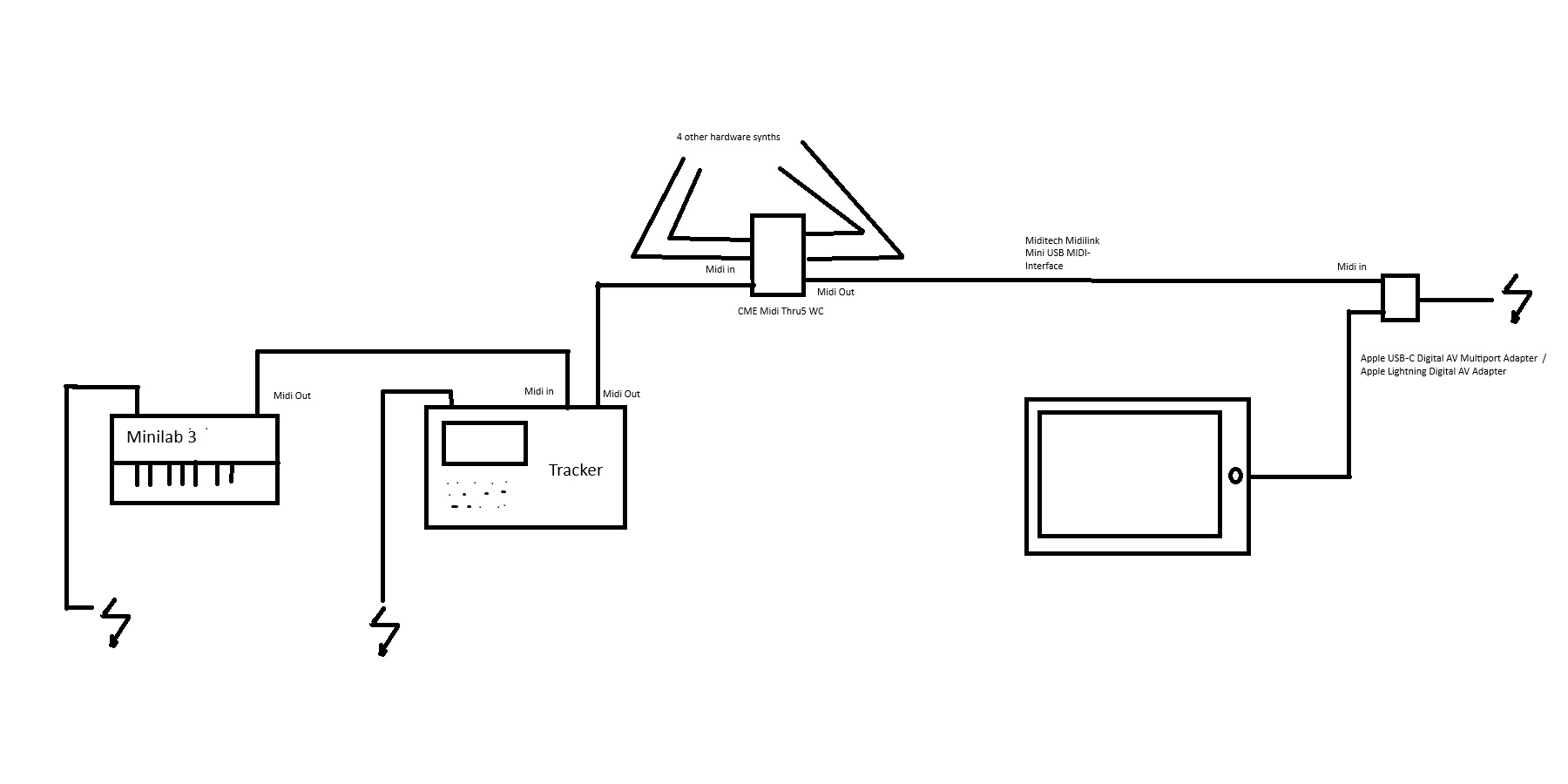
I use Cubasis 2 as the host for my AU plugins.
2 Likes
the manual does mention this in regards to USB audio. Maybe it’s unstable with lots of tracks? I’ve also seen a lot of manufacturers recommend the no hub thing just by default because hubs used to be VERY problematic but my understanding is that modern USB has more or less fixed the issue (I went down a USB rabbit hole on wikipedia recently lol).
@sfieldsx72 I would start with a USB C hub connected to the iPhone. I can actually test this for you tonight if you like, it’s relevant to my interests somewhat lol. I don’t have the Keystep but I have a Launchkey Mini mk4.
1 Like
so I got it working with a powered hub, but not a passive hub which weirdly enough powered both devices on lol, but Aum did not see them. The powered hub was strange, I think it uses a lot more power since it’s meant for a laptop, has HDMI, 5 USB ports, etc. The Tracker+ wouldn’t even power on using that hub. Once I supplied power to the PD port everything works and I could route the MIDI from the LK to the T+
I’m playing notes on thje Tracker+ with the Launchkey Mini right now. Entered notes, too. I even have Transport 
I don’t think I have any more passive hubs I can try out, but if I find one I’ll report back
The One That Worked:
2 Likes
Thanks for all the info ! I will try all this as soon as I get all the gear!
Thanks so much for this!
Thank you !
Hi, to follow-up a little how are the minilab, tracker and your multi port adapter powered? Thanks
The Tracker and the Minilab are connected to my PC via USB (useful for controlling Cubase or similar software on the PC) and draw their power from there. The MIDI splitter and the multiport adapter each have their own USB power supply.
If you have sufficient technical skills, you can use the raspberry PI as a usb midi hub ( https://neuma.studio/raspberry-pi-as-usb-bluetooth-midi-host ). After setting up, it is enough to connect all devices (tracker, keyboard and phone) to Raspberry PI and they will exchange midi messages.
1 Like