What is the problem?
Currently, there is no Keytrack parameter on the filter page
What should this feature achieve?
KeyTrack will automatically open the filter on higher notes and roll it off on the bass side.
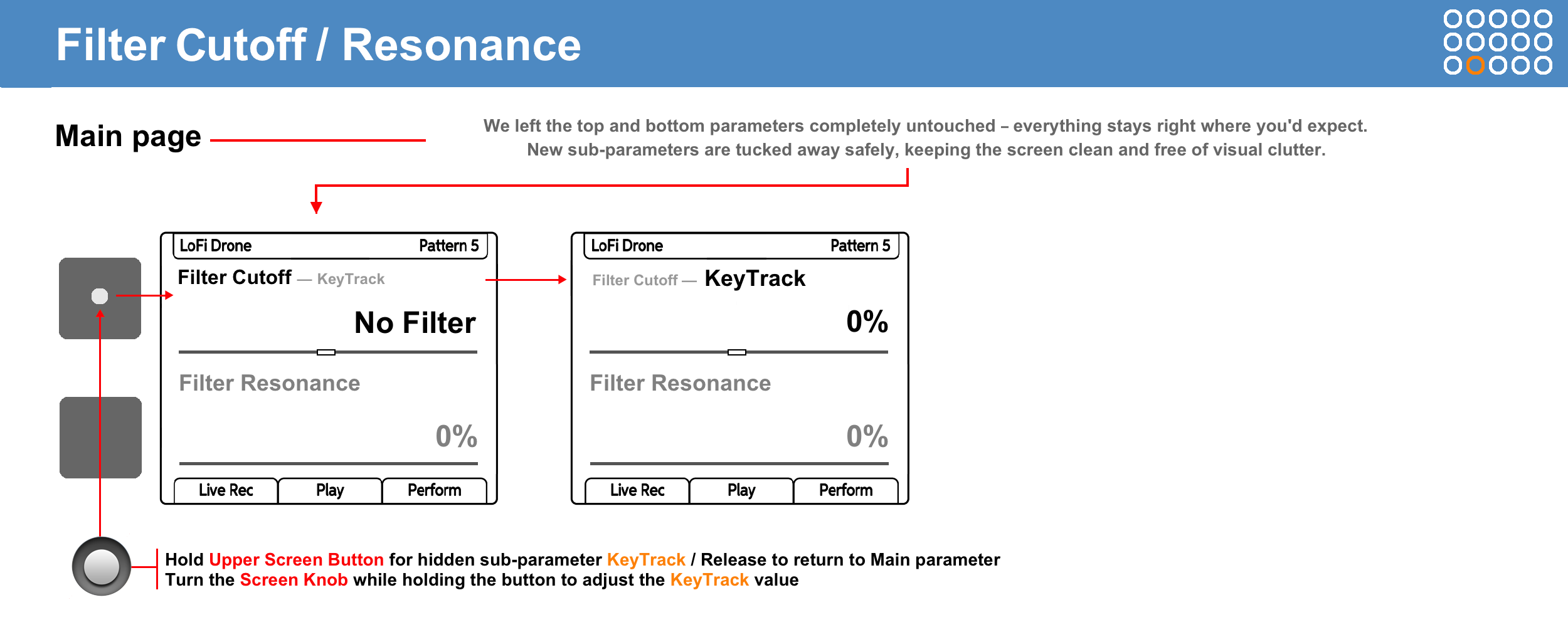
I’d like to suggest adding a Keytrack parameter to the filter page.
It automatically opens up the filter on higher notes and rolls it off on the bass side. This balances out the overall brightness across the whole keyboard, so you don’t have to tweak the Cutoff manually for every single note. Plus, it can be used as a neat modulation source if you want to get creative.
WORKFLOW
Step 1: KeyTrack for a specific step
-
Select a single step on the sequencer grid or press and hold multiple steps simultaneously.
-
Navigate to the Filter Cutoff / Resonance page.
-
Press and hold the Upper Screen Button: the Filter Cutoff parameter instantly changes to the KeyTrack sub-parameter.
-
While holding the screen button, turn the Screen Knob to set the desired keyboard tracking percentage (for example, -50%, +100%, etc.).
-
Release the screen button. The parameter returns to the original Filter Cutoff value.
Step 2: Track Edit
-
Select the entire track by pressing the Select button.
-
Navigate to the Filter Cutoff / Resonance page.
-
Press and hold the Upper Screen Button to display the hidden KeyTrack sub-parameter.
-
While holding the screen button, turn the Screen Knob to simultaneously change the KeyTrack values for all steps on this track.
Backward compatibility
This won’t be an issue at all. When you load an old project, the keytracking parameter will be turned off by default. Everything will sound exactly as before.